Table of Contents
Introduction
Every engineer has that one project — the one that starts as a simple idea and evolves into a full-blown learning laboratory. For me, that project is this Publisher Web App: a system designed to publish announcements across multiple social media channels simultaneously. The primary use case? The AWS Certification Announcer, a community tool where members submit their AWS certification achievements and the platform automatically publishes them to Facebook, Instagram, WhatsApp, LinkedIn, Email, etc.
What began as a practical need for the AWS User Group quickly became an exercise in applying every DevSecOps principle I wanted to put into practice, but couldn’t until now. This article walks through the fundamentals of the project — the architecture, the security posture, the deployment strategy, and the lessons learned along the way.
The entire project is open source and available at github.com/Walsen/devsecops-poc .
The Vision: More Than Just Posting
The goal was never to build “yet another social media scheduler.” The vision was to create a platform that could serve as a reference implementation for modern cloud-native development — one that demonstrates how to build software that is secure by design, portable across deployment models, and maintainable over time.
The platform needed to:
- Publish to several channels: Facebook, Instagram, WhatsApp, LinkedIn, Email, and more
- Support social authentication: Google, GitHub, LinkedIn, or email/password via Amazon Cognito
- Schedule messages: Queue announcements for future delivery
- Enforce role-based access: Admin and Community Manager roles with strict boundaries
- Be secure from day one: Zero Trust networking, encrypted everything, WAF protection, and a hardened supply chain
- Run in two deployment modes: Containers (ECS Fargate) or Serverless (Lambda + DynamoDB), switchable at deploy time
Hexagonal Architecture: The Foundation
If there is one architectural decision that made everything else possible, it is the adoption of hexagonal architecture (also known as Ports & Adapters).
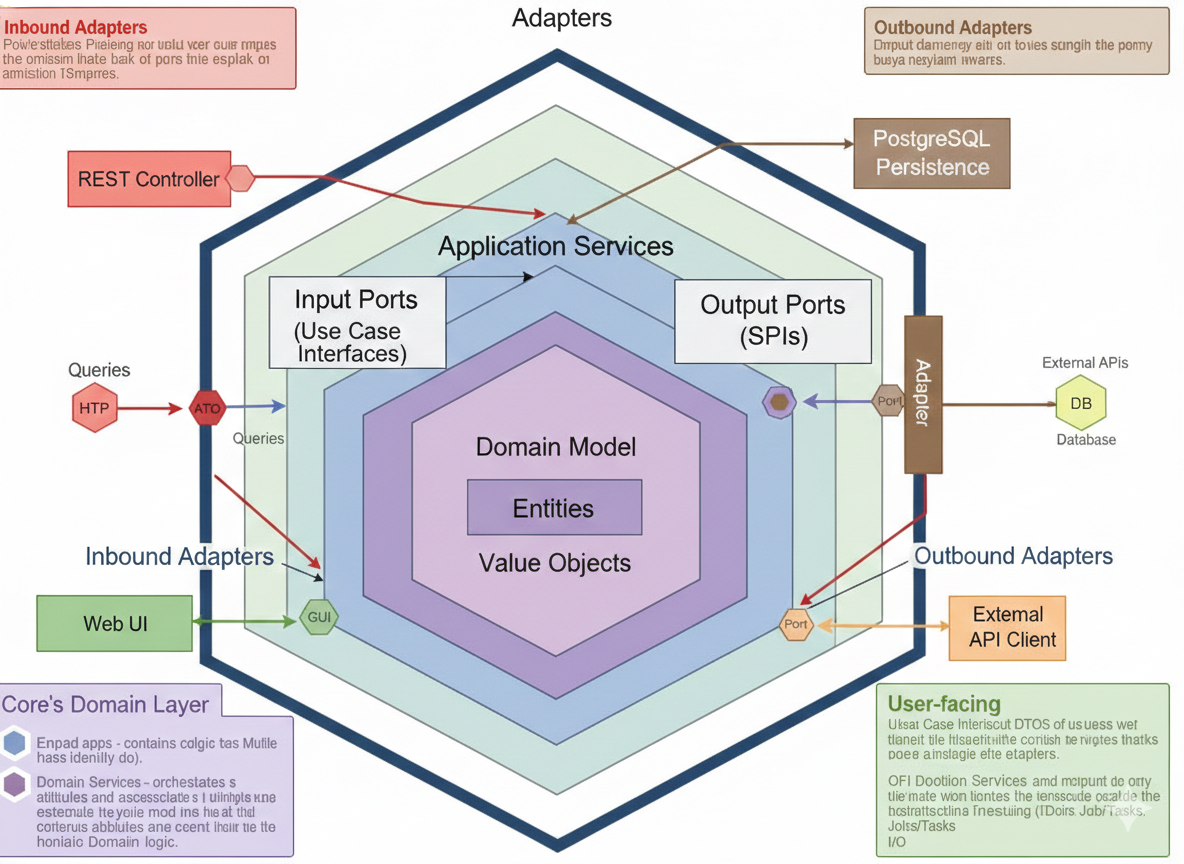
This pattern separates the system into three concentric zones:
| Zone | Responsibility | Dependencies |
|---|---|---|
| Driving Adapters | Receive external input (HTTP, Kinesis events, cron) | Depend on Inbound Ports |
| Application Core | Business logic, use cases, domain model | Zero external dependencies |
| Driven Adapters | Implement outbound integrations (DB, queues, APIs) | Implement Outbound Ports |
The application core — domain entities, use cases, and port interfaces — has absolutely zero knowledge of the outside world. It doesn’t know if it’s running on ECS or Lambda. It doesn’t know if the database is PostgreSQL or DynamoDB. It only knows about abstractions.
The Domain Model
The domain is built with pure Python dataclasses:
| Entity / Value Object | Description |
|---|---|
Message (Aggregate Root) |
Tracks content, channels, schedule, status, and per-channel deliveries |
Certification (Entity) |
AWS certification achievement with member info and type |
ChannelType (Value Object) |
Enum: facebook, instagram, linkedin, whatsapp, email, sms |
MessageStatus (Value Object) |
Lifecycle: DRAFT → SCHEDULED → PROCESSING → DELIVERED / FAILED |
DeliveryResult (Value Object) |
Per-channel outcome with external ID or error |
Ports and Adapters in Practice
The MessageRepository port is the same interface regardless of deployment mode. Only the adapter changes:
# Port (shared across both modes)
class MessageRepository(ABC):
    @abstractmethod
    async def get_by_id(self, id: UUID) -> Message | None: ...

    @abstractmethod
    async def save(self, message: Message) -> None: ...

# Container adapter
class PostgresMessageRepository(MessageRepository):
    def __init__(self, session: AsyncSession):
        self._session = session

# Serverless adapter
class DynamoMessageRepository(MessageRepository):
    def __init__(self, table_name: str):
        self._table = boto3.resource("dynamodb").Table(table_name)
This is the key enabler for the dual-mode deployment strategy. Business logic is completely decoupled from infrastructure.
Three Services, One Stream
The platform is composed of three microservices connected by Amazon Kinesis Data Streams:
REST + Auth"] end subgraph Queue["Event Stream"] KINESIS["Kinesis
Data Streams"] end subgraph Worker["Worker Service"] CONSUMER["Kinesis Consumer
Channel Delivery"] end subgraph Scheduler["Scheduler Service"] CRON["APScheduler
Due Message Scanner"] end subgraph DB["Data Layer"] RDS[("PostgreSQL
or DynamoDB")] end FASTAPI -->|"Publish Event"| KINESIS KINESIS -->|"Consume"| CONSUMER CRON -->|"Poll due messages"| RDS CRON -->|"Publish Event"| KINESIS FASTAPI --> RDS style Queue fill:#fff3e0 style DB fill:#fce4ec
- API Service: Handles HTTP requests, authentication, and message scheduling. Implements the full hexagonal stack with FastAPI routes, middleware, and Cognito JWT validation.
- Worker Service: Consumes messages from Kinesis and delivers them to the appropriate channels. Supports two publishing strategies — direct API calls or AI-powered content adaptation via Amazon Bedrock.
- Scheduler Service: Polls the database for scheduled messages and publishes them to Kinesis when their delivery time arrives.
Each service has its own main.py that serves as the composition root — the only place where concrete implementations are imported and wired together. No other module imports from infrastructure/ directly.
Dual-Mode Deployment: Containers or Serverless
This is where hexagonal architecture pays off in a very tangible way. The platform supports two fully independent deployment modes, switchable at deploy time via a single CI/CD parameter:
Containers (infra/) |
Serverless (infra-fs/) |
|
|---|---|---|
| Compute | ECS Fargate | Lambda |
| Database | PostgreSQL (RDS) | DynamoDB (Single-Table) |
| API Gateway | ALB + CloudFront | API Gateway + CloudFront |
| Scheduler | ECS Service (APScheduler) | EventBridge + Lambda |
| Cost (low traffic) | ~$180-200/mo | ~$5-15/mo |
Both modes share the same domain and application layers. Only the infrastructure adapters change. The deploy workflow selects the mode via infra_type input (containers or serverless), routing to the corresponding CDK project. Stack names are fully independent, so both can coexist in the same AWS account during migration.
Why This Matters
Different stages of a project have different needs:
| Stage | Recommended Mode | Reason |
|---|---|---|
| Development / Prototyping | Serverless | Near-zero cost, instant deploys |
| Staging / QA | Either | Match production or save costs |
| Production (steady traffic) | Containers | Predictable latency, no cold starts |
| Production (variable traffic) | Serverless | Pay-per-use, auto-scaling |
You can start cheap with serverless and migrate to containers when traffic justifies the fixed cost — or vice versa — without rewriting a single line of business logic.
Running Both Simultaneously
Since stack names are independent, you can run both modes in parallel during a migration window. This allows smoke testing against the new mode before cutting over, gradual traffic shifting using weighted DNS routing (Route 53), and instant rollback by switching DNS back.
Zero Trust Security: Trust Nothing, Verify Everything
Security is not a feature you bolt on at the end. It is a design principle that permeates every layer of the system. The platform implements a Zero Trust architecture based on three pillars:
Authorize based on context
Multi-factor authentication"] LEAST["Least Privilege
Just-in-time access
Role-based permissions"] BREACH["Assume Breach
Minimize blast radius
Segment access
End-to-end encryption"] end
Network Security
All traffic flows through multiple security layers:
+ Shield"] CF --> WAF["WAF
OWASP Rules"] WAF -->|"TLS 1.3"| ALB["ALB"] ALB -->|"TLS 1.3"| ECS["ECS Fargate"] ECS -->|"TLS"| RDS[("RDS
PostgreSQL")] style CF fill:#e8f5e9 style WAF fill:#e8f5e9
The VPC is segmented into public, private, and isolated subnets. Security groups enforce micro-segmentation — the ALB can only talk to the API, the API can only talk to the Worker and the database, and the database accepts connections only from authorized services.
Authentication Flow
Email/Password"] GOOGLE["Google
OAuth 2.0"] GITHUB["GitHub
OIDC"] LINKEDIN["LinkedIn
OIDC"] end subgraph Pool["Cognito User Pool"] FEDERATE["Federation Layer"] USERS["User Directory"] GROUPS["Groups
admin, community-manager"] end subgraph Tokens["Token Issuance"] JWT["JWT Tokens
• Access Token (1h)
• ID Token (1h)
• Refresh Token (30d)"] end COGNITO --> FEDERATE GOOGLE --> FEDERATE GITHUB --> FEDERATE LINKEDIN --> FEDERATE FEDERATE --> USERS USERS --> GROUPS GROUPS --> JWT
Every request is validated against Cognito JWTs with strict algorithm restriction (RS256 only), audience and issuer validation, and JWKS caching with TTL refresh. OAuth credentials for social providers are stored in AWS Secrets Manager.
API Security Middleware
The API service implements a comprehensive security middleware stack:
| Concern | Implementation |
|---|---|
| Authentication | Cognito JWT validation with algorithm restriction |
| CSRF Protection | Double Submit Cookie with HMAC-signed tokens |
| Rate Limiting | Per-user sliding window (60 req/min) |
| Request Validation | 1MB size limit, input sanitization, HTML escaping |
| Security Headers | CSP, HSTS, X-Frame-Options, Permissions-Policy |
| Content Filtering | Prompt injection detection + PII scanning |
| Idempotency | Hash-based dedup on message_id + channels |
Data Protection
Encryption is applied at every layer:
- In Transit: TLS 1.3 everywhere — CloudFront to ALB, ALB to ECS, ECS to RDS, ECS to Kinesis
- At Rest: KMS encryption for S3, RDS, and Kinesis
- In Use: No PII in logs, field-level encryption for sensitive data
Secure Supply Chain
The build pipeline is hardened against supply chain attacks with multiple security gates:
Signed Commits"] PR["PR Review
Required"] end subgraph Scan["Security Scanning"] DEP["Dependency
Audit"] SAST["Static
Analysis"] SECRET["Secret
Scanning"] end subgraph Build["Container Build"] BASE["Distroless
Base Image"] NONROOT["Non-root
User"] READONLY["Read-only
Filesystem"] end subgraph Sign["Signing"] SIGN["Image
Signing"] SBOM["SBOM
Generation"] end Source --> Scan --> Build --> Sign
Defense in Depth: Multiple Scanners
No single scanner catches everything. The project uses six complementary tools:
| Scanner | Type | Purpose |
|---|---|---|
| Semgrep | SAST | OWASP Top 10 patterns, custom rules |
| Bandit | SAST | Python-specific security issues |
| pip-audit | SCA | Python CVE database (PyPI Advisory) |
| Trivy | SCA | SBOM vulnerability scanning |
| Gitleaks | Secrets | Hardcoded secrets detection in git history |
| Checkov | IaC | AWS security misconfigurations in CDK/CloudFormation |
Each tool covers blind spots the others miss. Semgrep catches SQL injection and XSS patterns. Bandit finds Python-specific issues like unsafe YAML loading. pip-audit and Trivy handle known CVEs. Gitleaks prevents credential leaks. Checkov ensures the infrastructure itself is secure — no public S3 buckets, no missing encryption, no overly permissive IAM.
Container Security
Production containers are built with security as a first-class concern:
- Distroless base images: No shell, minimal attack surface
- Non-root user: Containers run as
nonrootby default - Read-only filesystem: No writes to the root filesystem
- Pinned dependencies: Lock files with hashes for reproducibility
- Resource limits: CPU and memory constraints to prevent abuse
CI/CD with GitHub Actions OIDC
The project uses GitHub Actions OIDC to assume AWS IAM roles without storing long-lived credentials. A CDK bootstrap stack (GitHubOIDCStack) creates the OIDC provider and two IAM roles:
- Deploy Role (
github-actions-deploy): For CDK deployments and ECR pushes - Security Scan Role (
github-actions-security-scan): For Prowler audits with read-only access
No AWS access keys are stored in GitHub Secrets. Every deployment uses short-lived credentials (1 hour) obtained via OIDC federation.
The Golden Thread: Distributed Security Tracing
One of the most interesting aspects of the project is the Golden Thread — a distributed tracing exercise that demonstrates end-to-end request correlation across all infrastructure layers using a single correlation ID (X-Request-ID).
The correlation ID flows through:
- Edge Layer: WAF logs (CloudFront + ALB)
- Application Layer: API structured logs (structlog JSON)
- Async Layer: Kinesis event → Worker logs
- Database Layer: PostgreSQL audit logs (pgaudit) with SQL comments
/* correlation_id=golden-thread-test-1739... */ INSERT INTO messages (id, content_text, ...) VALUES (...)
All queryable from CloudWatch Logs Insights with a single filter:
fields @timestamp, service, event, correlation_id, method, path, status_code
| filter correlation_id = "YOUR_TRACE_ID"
| sort @timestamp asc
Attack Simulation Exercises
The project includes hands-on exercises that simulate real attacks and trace them across layers:
- SQL Injection: Send a
' OR 1=1--payload, verify WAF blocks it, confirm the request never reaches the application - XSS Attempts: Send
<script>alert(1)</script>, trace the WAF block in CloudWatch - Brute Force Detection: Send 60 rapid requests, observe rate limiting kick in, check CloudWatch alarms
- Full Pipeline Trace: Schedule a message with a known correlation ID, trace it from CloudFront WAF → ALB WAF → API → Kinesis → Worker → PostgreSQL
The documentation also includes exercises using professional penetration testing tools — nmap, nikto, sqlmap, ffuf, nuclei, and hydra — each with corresponding CloudWatch queries to trace the attack signatures across the infrastructure.
AI-Powered Content Adaptation
The Worker service supports two publishing strategies, selectable via configuration:
Same content, all channels"] AGENT["AgentPublisher
AI-adapted per platform"] end subgraph Tools["@tool Functions"] FB["post_to_facebook()"] IG["post_to_instagram()"] LI["post_to_linkedin()"] WA["send_whatsapp()"] end subgraph Gateways["Channel Gateways"] FB_GW["Facebook Gateway"] IG_GW["Instagram Gateway"] LI_GW["LinkedIn Gateway"] WA_GW["WhatsApp Gateway"] end DIRECT --> Gateways AGENT --> Tools --> Gateways
The AgentPublisher uses the Strands Agents SDK with Amazon Bedrock (Claude) to intelligently adapt content for each platform:
| Platform | Adaptation |
|---|---|
| Longer posts, emojis, hashtags at end | |
| Visual focus, heavy emojis, hashtags | |
| Professional tone, formal language | |
| Short, celebratory, personal |
The agent reasons about which tools to call, executes them, observes results, and continues until the task is complete. Content filtering middleware protects against prompt injection and PII leakage in AI-generated output.
AI-Powered Security Testing Agent
Perhaps the most novel addition to the project is the Security Testing Agent — an AI-powered interactive penetration testing assistant built with the Strands Agents SDK and Amazon Bedrock. Instead of manually running security tests and interpreting results, you have a conversation with an agent that can run tests, diagnose failures, query AWS resources, and even auto-fix test code.
• Reasoning
• Tool Selection
• Execution"] end subgraph Tools["@tool Functions"] TEST["Test Runners
run_pytest_test
run_all_tests_parallel
run_fast_tests"] AWS["AWS Read-Only
CloudFormation outputs
CloudWatch Logs
WAF Web ACLs"] CODE["Code Tools
read_test_file
fix_test_code"] end subgraph Infra["AWS Resources (Read-Only)"] CF["CloudFormation"] CW["CloudWatch Logs"] WAF["WAF v2"] end CLI --> LOOP LOOP --> TEST LOOP --> AWS LOOP --> CODE AWS --> CF AWS --> CW AWS --> WAF style Agent fill:#e3f2fd style Tools fill:#fff3e0 style Infra fill:#e8f5e9
The interaction looks like this:
🔒 Penetration Testing Agent Ready!

You: Run all fast tests
Agent: I'll run the fast test suite in parallel, skipping slow scans...
       ✅ All tests passed in 8 seconds!

You: The TLS test is failing, can you debug it?
Agent: Let me run the TLS test and check the logs...
       [runs test, queries CloudFormation for endpoints, checks CloudWatch]
       The certificate for api.ugcbba.click expired. Here's what I found...
Strict Guardrails
The agent enforces strict security boundaries:
- Can only run tests from a hardcoded allowlist — no arbitrary command execution
- AWS access is read-only — cannot create, modify, or delete any resources
- File access is sandboxed to the
testing/directory — path traversal is blocked - Refuses tasks unrelated to penetration testing
The Test Suite
The agent wraps a comprehensive pytest-based security test suite running inside a Kali Linux container:
| Category | Tests | Duration |
|---|---|---|
| Fast (< 10s each) | Health, security headers, TLS, CORS, cookies, error disclosure, HTTP methods, origin access, SQLi, XSS | ~10s total |
| Medium (15-30s) | Rate limiting, CSRF end-to-end, IDOR protection | ~1 min |
| Slow (30s-10min) | nmap port scan, Nikto web scan, sqlmap automated injection | ~15 min |
The agent is smart about which tests to run — it prioritizes recently failed tests, skips slow scans unless explicitly requested, and caches successful results for 5 minutes to avoid redundant runs. Parallel execution via pytest-xdist makes the full fast suite complete in about 8 seconds.
Automated Penetration Testing Framework
Beyond the AI agent, the project includes a standalone automated penetration testing framework using Dockerized Kali Linux. This is the foundation that the agent builds on, but it can also be used independently in CI/CD pipelines.
# Build the Kali container
docker build -f testing/Dockerfile.kali -t pentest:latest testing/

# Quick smoke test
docker run --rm -e TARGET_URL=http://your-alb.amazonaws.com pentest smoke

# Full test suite
docker run --rm -e TARGET_URL=http://your-alb.amazonaws.com pentest all

# Generate report
docker run --rm -v $(pwd):/tests -e TARGET_URL=$TARGET_URL pentest report
The framework integrates with GitHub Actions for scheduled weekly scans and on-demand testing, with results uploaded as workflow artifacts.
Threat Detection and Incident Response
The platform implements automated threat detection and response:
Malicious IPs, unusual API calls"] SH["Security Hub
Aggregated findings, compliance"] CT["CloudTrail
API audit log"] end subgraph Response["Automated Response"] EB["EventBridge Rule"] LAMBDA["Response Lambda"] WAF["WAF IP Set Update"] end subgraph Alert["Alerting"] SLACK["Slack"] end GD -->|"Finding"| EB EB -->|"Severity >= 4"| LAMBDA LAMBDA -->|"Block IP"| WAF LAMBDA -->|"Notify"| Alert SH -.-> GD CT -.-> SH
GuardDuty monitors for threats. When a finding with severity >= 4 is detected, an EventBridge rule triggers a Lambda function that automatically blocks the offending IP in the WAF IP set and sends a detailed alert to Slack. Security Hub aggregates findings from GuardDuty, CloudTrail, and AWS Config rules for a unified compliance view.
Security Observability
CloudWatch dashboards and alarms provide real-time visibility:
| Metric | Threshold | Action |
|---|---|---|
| Auth failures (5min) | >= 20 | Alarm + SNS |
| CSRF failures (5min) | >= 20 | Alarm + SNS |
| Access denied (5min) | >= 30 | Alarm + SNS |
| Rate limit hits (5min) | >= 100 | Alarm + SNS |
| Error rate (5min) | >= 10 | Alarm + SNS |
| Critical errors (1min) | >= 1 | Alarm + SNS |
| API latency p95 | > 1000ms | Alarm + SNS |
The Developer Experience
A good DevSecOps project is not just about security and architecture — it is also about making the developer’s life easier. The project uses Devbox for isolated development environments and Just as a task runner.
The justfile provides a comprehensive set of commands:
# Development
just dev          # Start local services and tail logs
just up           # Start PostgreSQL + LocalStack
just test         # Run all tests
just lint-local   # Lint all services locally

# Security
just security-scan    # SAST + SCA + Secrets scan
just trivy-scan       # Container vulnerability scan
just sbom-scan        # Generate and scan SBOMs
just iac-scan         # Infrastructure scan with Checkov
just pentest-full     # Run the full penetration test suite

# AWS Resource Management (Cost Saving)
just aws-up       # Scale up ECS services + start RDS
just aws-down     # Scale down to zero (save money)
just aws-status   # Check resource status
The aws-up and aws-down commands are particularly useful — they allow scaling the entire infrastructure to zero when not in use, saving significant costs during development.
Project Structure
The codebase is organized for clarity and separation of concerns:
.
├── api/                    # API service (FastAPI + hexagonal)
│   ├── src/
│   │   ├── domain/         # Business entities, value objects
│   │   ├── application/    # Use cases, ports, DTOs
│   │   ├── infrastructure/ # Adapters (DB, Kinesis, Secrets)
│   │   └── presentation/   # HTTP routes, middleware
│   └── tests/
│
├── worker/                 # Worker service (Kinesis consumer)
│   ├── src/
│   │   ├── domain/         # Ports for channels, publishers
│   │   ├── application/    # Delivery service
│   │   ├── infrastructure/ # Publisher adapters (Direct, AI Agent)
│   │   └── channels/       # Channel gateways (FB, IG, LI, Email, SMS)
│   └── tests/
│
├── scheduler/              # Scheduler service (cron + ECS)
├── api-lambda/             # API Lambda handler (serverless)
├── worker-lambda/          # Worker Lambda handler (serverless)
├── scheduler-lambda/       # Scheduler Lambda handler (serverless)
├── web/                    # Frontend (React + Vite + TypeScript)
│
├── testing/                # Penetration testing framework
│   ├── pentest_agent.py    # AI security testing agent (Strands SDK)
│   ├── test_pentest.py     # Security test cases (pytest)
│   ├── Dockerfile.kali     # Kali Linux container with tools
│   └── justfile            # Pentest task runner
│
├── infra/                  # CDK infrastructure (containers)
│   └── stacks/             # Network, Security, Auth, Data, Compute, Edge, Monitoring
│
├── infra-fs/               # CDK infrastructure (serverless)
│   └── stacks/             # Data, Auth, API, Worker, Scheduler, Security, Frontend
│
├── docs/                   # Comprehensive documentation
├── .github/workflows/      # CI/CD (deploy + security scan)
├── devbox.json             # Development environment
├── docker-compose.yml      # Local services
└── justfile                # Task runner
Lessons Learned
Building this project reinforced several convictions:
Hexagonal architecture is not academic overhead. It is the single decision that enabled dual-mode deployment, clean testing, and a codebase that remains navigable as it grows. The upfront investment in defining ports and adapters pays for itself many times over.
Security scanning must be layered. No single tool catches everything. The combination of SAST, SCA, secrets scanning, IaC scanning, and DAST provides genuine defense in depth. The key is making these scans fast and automatic — if they slow down the developer, they will be bypassed.
Correlation IDs are non-negotiable. The ability to trace a single request from CloudFront through the API, into Kinesis, through the Worker, and into the database is invaluable for debugging, incident response, and security forensics. Implement them from day one.
Cost management is a feature. The aws-up / aws-down pattern for scaling resources to zero when not in use is simple but effective. For a project like this, it is the difference between a $200/month bill and a $5/month bill during development.
AI agents need guardrails. The Strands Agents integration is powerful, but without content filtering, prompt injection detection, and output validation, it is a liability. The agent can only execute pre-approved operations through well-defined tool interfaces — never raw API calls. The same principle applies to the Security Testing Agent: it operates within a strict allowlist of tests and read-only AWS access, proving that AI-powered automation and security boundaries can coexist.
Conclusion
This project is a living laboratory. It is not finished, and it probably never will be — because the landscape of threats, tools, and best practices is always evolving. But it serves its purpose: a concrete, open-source reference for how to build modern cloud-native applications with security woven into every layer.
If you are starting a new project and wondering where to begin with DevSecOps, my advice is simple: start with the architecture. Get hexagonal architecture right, define your ports and adapters, and the rest — security, testing, deployment flexibility — becomes dramatically easier.
The code is open source. Fork it, break it, improve it. That is what it is there for.
Links
- Repository: https://github.com/Walsen/devsecops-poc
- Hexagonal Architecture Reference: docs/hexagonal-architecture.md
- Security Documentation: docs/security.md
- Golden Thread Tracing: docs/golden-thread-tracing.md
- Dual-Mode Deployment Guide: docs/dual-mode-deployment.md
- Penetration Testing Guide: docs/penetration-testing.md
- Security Testing Agent: docs/security-testing-agent.md
- Automated Penetration Testing: docs/automated-penetration-testing.md
- Testing Guide: docs/testing.md
- AI Agents Documentation: docs/ai-agents.md
Random Recommended Posts


Keyboard Shortcuts
| Command | Function |
|---|---|
| ? (Shift+/) | Bring up this help modal |
| g+h | Go to Home |
| g+p | Go to Posts |
| g+e | Open Editor page on GitHub in a new tab |
| g+s | Open Source page on GitHub in a new tab |
| r | Reload page |