Table of Contents
Introduction
Since I was a child, computers have held a magnetic fascination for me. I vividly remember the first time I saw one in my mother’s office at the age of eleven; in that exact moment, I knew precisely what I wanted to do with my life.
Although destiny led me down the path of infrastructure, I never truly abandoned the dream of developing applications. While I have a solid foundation in programming and can hold my own in the terminal, a lack of daily practice and the time required for a deep dive had—until now—prevented me from producing professional-grade software.
Today, however, the landscape has shifted. With the rise of Artificial Intelligence, LLMs, and Generative AI, a new horizon has opened for profiles like mine: the ability to bring complex applications to life without needing to be an expert in deep syntax, by leveraging AI-powered editors that amplify our creative potential.
The Challenge: AWS Community Day Bolivia 2025
This adventure began with the organization of AWS Community Day Bolivia 2025. This year, the honor of leading the event fell to the AWS User Group Cochabamba, a team where I serve as one of the leaders. Organizing an event of this magnitude requires impeccable coordination with volunteers; while tools like Google Forms or Sheets are useful, I was looking for something more: a comprehensive, custom-built solution.
My vision was to build a platform that would allow us to:
- Manage Projects: Create and administer specific initiatives for the event.
- Dynamic Registration: Allow volunteers to sign up directly for projects.
- Multichannel Communication: Send announcements and updates from a centralized hub.
- Admin Panel: A secure portal for operations exclusive to authorized leaders.
- Technological Innovation: Test Kiro, Amazon’s current IDE, and its powerful generative AI capabilities.
- Community Legacy: Create a project “by the community, for the community” that could serve as a real-world case study in our talks.
The Journey is the Reward
Although the development wasn’t finalized in time for the Community Day, the experience was a revelation. This process deeply enriched my understanding of Generative AI, application architecture, and the modern software development lifecycle. Above all, it allowed me to discover the “tips & tricks” of working with AI agents and the delicate human-machine synergy required to achieve the desired result.
As of this writing, Kiro has advanced significantly. Many of the initial limitations I encountered have been addressed—particularly regarding session management and memory—solidifying its position as a cutting-edge tool that leaves previous versions behind.
“Vibe Coding” is No Joke
I must confess, I was quite naive at first. I trusted Kiro’s output almost blindly because, initially at least, it generated the site’s starting structure correctly and surprisingly fast. The project kicked off with a specifications proposal (a Spec) designed by Kiro itself; in my prompt, I asked it to generate a three-tier serverless project: AstroJS for the frontend, FastAPI for the backend, and DynamoDB for data persistence.
During the early stages, I worked with three editors open and deployed directly from my local machine to the User Group’s AWS account. However, the time came to do things right and set up deployment via a CI/CD workflow (because, as the saying goes: “the shoemaker’s son always goes barefoot”). For this, I decided to use AWS CDK. In my experience, managing state files is an additional headache I wanted to avoid, so I ruled out Terraform and Pulumi from the start.
Unifying All Projects Under a Single Session
At the start of every task, I would enter a prompt to polish details that didn’t quite look right or weren’t functioning correctly. This is where I hit my first major roadblock: I had four different Kiro sessions that shared no context with one another.
If Kiro detected an API bottleneck while developing the frontend, the tool was essentially “blind” to the other components. This forced me into a constant cycle of copying and pasting to transfer data from one environment to another. To solve this, I decided to centralize everything into a single session. I grouped all the repositories into a root directory so that Kiro could navigate between them with full awareness of how the components interacted.
Below is the local structure I defined to achieve that synchrony:
❯ tree -L 1 -a
.
├── .amazonq
├── .devbox
├── .envrc
├── .gitignore
├── .kiro
├── .python-version
├── .venv
├── README.md
├── devbox.json
├── devbox.lock
├── generated-diagrams
├── pyproject.toml
├── registry-api
├── registry-documentation
├── registry-frontend
├── registry-infrastructure
└── uv.lock

9 directories, 8 files
The reader will notice that I have Devbox configured in the root directory. I made this choice because Kiro frequently needed to run Python scripts to sanitize repositories, perform searches, or handle troubleshooting tasks. Therefore, I saw the need to provide it with an isolated dependency chain, thus avoiding the installation of unnecessary software on my primary operating system.
Clear Rules: The Art of Coexistence
This was the most complex stage and the one that demanded the most time. It was a period of alignment between the AI and myself; the moment where we discovered our character, our limits, and just how much we could tolerate one another. Readers might be skeptical, but after working through dozens of sessions, I can confirm that each one develops a distinct “personality.” There is a subtle but real difference: the speed at which they grasp previous context, the tone of the conversation, and the level of initiative varies from session to session.
For those who haven’t yet experimented with Kiro (or Amazon Q), there are fundamental aspects that must be taken very seriously:
- Session Volatility: Sessions are temporary. Upon reaching a context limit, the session resets, transferring only a very brief summary of what happened. Critical details can be lost in this process, especially if the previous activity was intense.
- Trust Management: When running tools, Kiro asks if commands are safe. If you decline, it won’t execute anything; if you accept, it will run everything without further confirmation. It’s an “all or nothing” situation that requires vigilance.
- Git Structure Invisibility: Kiro does not natively understand the concept of a “repository.” It ignores the existence of commits, branches, or staged files. Because of this, you must be surgical: you have to tell it exactly which file to modify and which change to make.
- Project Ecosystem Disconnect: It doesn’t automatically assume the existence of config files, dependencies, or CI/CD workflows. To Kiro, every file is an isolated entity unless you provide the full map.
Ignoring these rules comes at a high price: Kiro will generate code that doesn’t work or doesn’t align with your goals. The most dangerous part is that the tool will always confidently assure you that everything is fine, leaving you with a false sense of success.
The breaking point came during an iteration where I requested an architectural adjustment. Kiro misinterpreted the instruction and altered the entire project: it transformed a Serverless architecture into one based on ECS and Aurora. It was a frustrating experience, but a necessary one. At that moment, I decided to establish rules of engagement: I created an “Architecture Primitives” document. In it, I defined strict guidelines on project structure, repository management, and expected behavior when publishing changes.
From that “contract” onward, the project stabilized. I moved forward with a fluidity that previously seemed impossible, and thanks to that, the beta version materialized much sooner than expected and is already available online.
The Blueprint: Anatomy of an Efficient Architecture
The project’s architecture is illustrated in the following diagram:
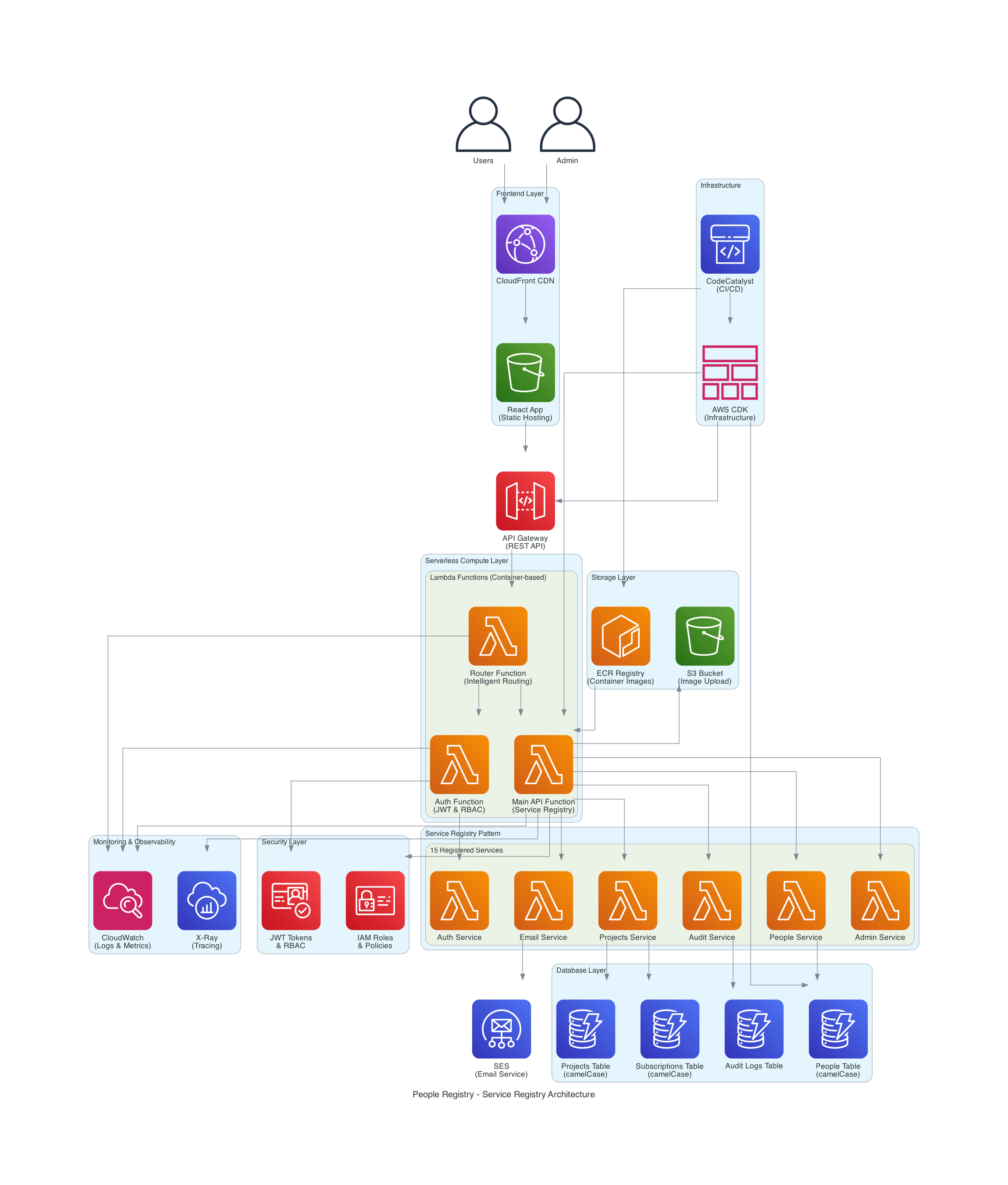
To achieve the goals of cost-efficiency and scalability, I designed a modular structure divided into logical layers. Here is how the components interact:
1. Access and Delivery Layer (Edge & Auth)
This is the first line of contact with the user, prioritizing security and speed.
- Amazon CloudFront: Acts as a CDN to distribute content with low global latency.
- Amazon Cognito: Serves as the Identity Provider (IdP), managing authentication and the lifecycle of both users and administrators.
2. Interface Layer (API Gateway)
We separated the control planes to ensure the security of sensitive operations.
- App API: The public entry point for application functionalities.
- Admin API: A dedicated, isolated Gateway for privileged administrative operations.
3. The Brain: Orchestration and Serverless Logic
This is where the system’s intelligence resides, utilizing an event-driven microservices approach.
- AWS Step Functions: Orchestrates complex workflows, ensuring each step executes in the correct order.
- Lambda Functions (Multi-purpose): Specialized functions that execute business logic, ranging from the Route Manager to access control (HBAC).
- Amazon ECR: Stores the container images that power our Lambdas, enabling consistent execution environments.
- AWS CDK: The “glue” of the entire project, allowing this infrastructure to be 100% reproducible through code.
4. Service Layer and Dynamic Registry
The heart of the system uses the Service Registry pattern to avoid tight coupling.
- Service Registry Pattern: Implemented via Lambdas acting as a central directory, enabling dynamic service discovery at runtime.
- Specialized Services: Dedicated modules for searches (Search Service), scheduled tasks (Cron Service), and personnel management (People Service).
5. Persistence and Communications (Data Layer)
A polyglot combination to handle different data types efficiently.
- Amazon DynamoDB: Our NoSQL database for high-speed caching and case management.
- Amazon S3: The central repository for image and object storage.
- Amazon SES: The notification engine for direct communication with volunteers.
6. Cross-Cutting Layers: Security and Observability
Components that span the entire architecture to ensure health and protection.
- Security and Configuration: Intensive use of AWS Secrets Manager and Parameter Store for secret management and zero-trust policies.
- 360° Observability: Implementation of Amazon CloudWatch for tracing, performance metrics, and log centralization.
The Project Manifesto: Patterns and Guidelines
To prevent our collaboration with AI from descending into the architectural chaos I mentioned earlier, I had to formalize our knowledge into two fundamental pillars. These documents didn’t just guide Kiro; they established the foundation of what I consider modern assisted development.
1. Enterprise Architecture Patterns (EAP)
It isn’t just about writing code; it’s about following principles that guarantee the system’s evolution. Based on the documentation from the Registry Project , we implemented three golden rules:
- Isolation and Decoupling: Every service operates autonomously. The use of the Service Registry is not optional; it is the mechanism that allows our infrastructure to scale without creating rigid dependencies (spaghetti code).
- Design for Resilience: We apply the Saga Pattern to manage distributed transactions in serverless environments, ensuring that if one step fails, the system can automatically recover or compensate for the error.
- Security by Design (Zero-Trust): No component trusts another by default. Every interaction requires identity validation through Cognito and access control based on strict policies.
2. AI Coexistence Manual: The “AI Assistant Guidelines”
Learning to talk to an agent like Kiro requires more than simple instructions; it requires a framework. These are the key takeaways from our Assistance Guidelines :
- Incremental Context: Instead of firing off massive prompts, we feed the AI specific fragments of context. If Kiro knows the database structure but not the authentication flow, we explicitly remind it of the latter before asking for a change in that area.
- Mandatory Human Validation: The AI proposes; the human disposes. We established that no deployment occurs without a manual review of the generated diffs. This prevented the project from accidentally transforming back into costly and unnecessary infrastructure.
- Living Documentation: Every time the AI generated an innovative solution, that logic was immediately documented. In this way, the “memory” of the project didn’t rely solely on Kiro’s current session, but on our central knowledge repository.
The Reasoning Behind a “Multi-Cloud-Ready” Architecture in an AWS Environment
Although the project lives and breathes in the Amazon Web Services ecosystem, I made a strategic decision from day one: the architecture had to be Multi-Cloud-Ready.
Many might ask: Why complicate the design if we already have the AWS toolset? The answer lies in technical sovereignty and cost control. By implementing patterns like the Service Registry and using Devbox to isolate environments, we avoid the dreaded vendor lock-in.
Designing this way forces us to separate business logic from infrastructure. This means that if the community decided tomorrow to migrate part of the workload to another platform or integrate external services, the core of our application would not suffer a technical trauma. It is an architecture designed for freedom—where AWS is our choice of excellence, but not our only possibility.
Conclusion
This project allowed me to experience a new way of working and a new way of thinking about software development. It isn’t about replacing developers; it’s about empowering them—freeing their minds so they can focus on what truly matters: creativity, innovation, and solving complex problems.
Generative AI is a powerful tool, but it requires a human to guide it, correct it, and refine it. That is what I love most about this experience: the fact that there is a human behind every line of generated code, and that this human has the capacity to learn, evolve, and improve.
It is not about letting the AI do everything; it is about learning to work alongside it, leveraging its power to do more, be more, and achieve things that previously seemed impossible.
I hope this journey serves as an inspiration for you to explore new ways of working, thinking, and creating. May it also remind you that the future isn’t something that just happens to us—it is something we build together, with tools, with technology, with AI, and with humanity.
Finally, to all those who have always wanted to develop applications but haven’t been able to: now is the time. From this point forward, nothing is impossible. However, do not go into this process blindly; you must do it with a solid foundation. So, it’s time to hit the books!
Thank you for reading this far, and as always, see you next time!
Links
Site: https://registry.cloud.org.bo
Repositories:
- API: https://github.com/awscbba/registry-api
- FrontEnd: https://github.com/awscbba/registry-frontend
- Infrastructure: https://github.com/awscbba/registry-infrastructure
- Documentation: https://github.com/awscbba/registry-documentation